Rotate Pages
Rotate individual or all pages in a PDF document
Drop your PDF here or click to browse
Supported format: PDF · Maximum file size: 100MB
Practice with sample PDFs
Download these fictional documents, upload them in the tool above, and compare your result with the reference below. The samples contain no personal information.
1. Download the input files
Combined document: 3 pages, with REPORT PAGE 1 and REPORT PAGE 2 followed by APPENDIX PAGE 1.
Input PDF: merged.pdf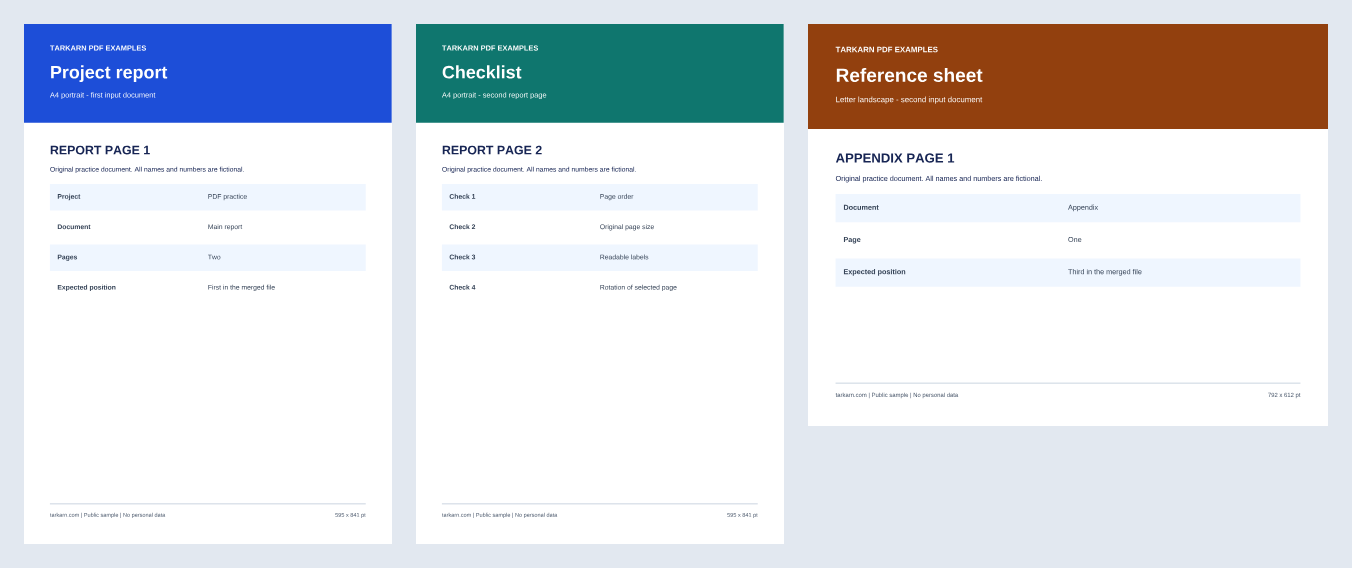
2. Try the example
- Upload merged.pdf using the file picker above.
- Under Individual Pages, select 90° for page 2. Leave pages 1 and 3 at 0°, then select Apply Rotation.
- Download your rotated PDF and compare page 2 with the reference. Check that pages 1 and 3 stayed unchanged.
3. Compare the expected result
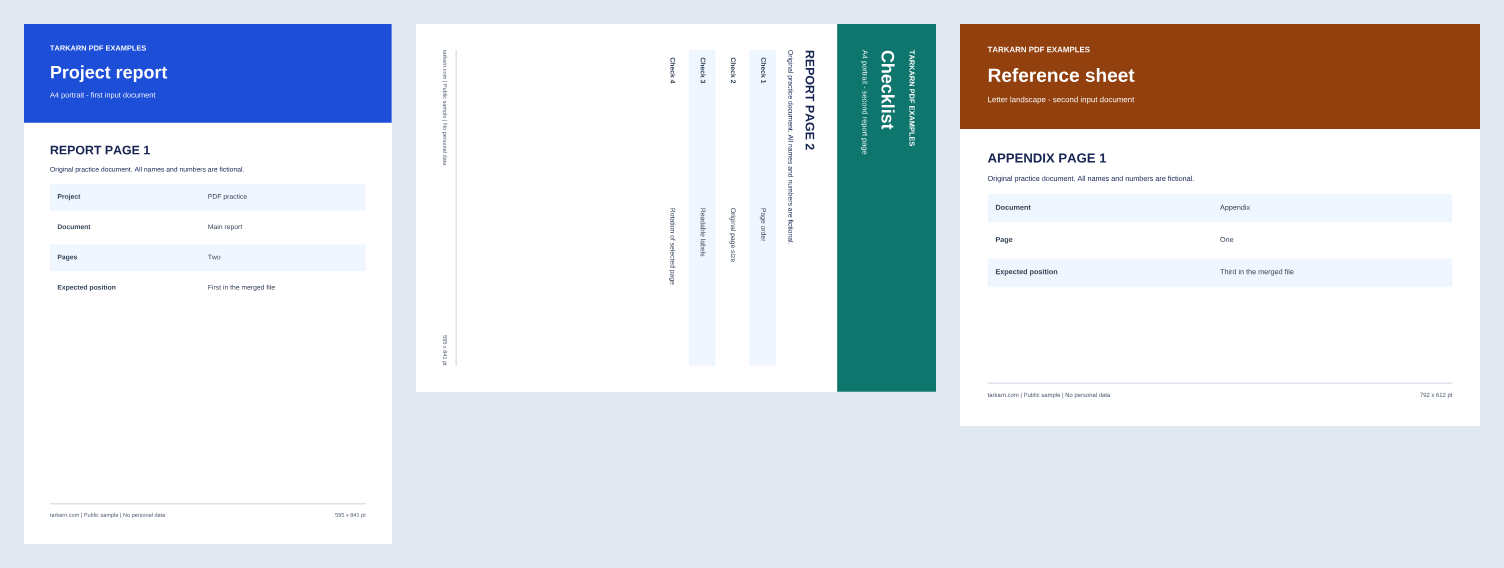
3 pages in the original order. Only REPORT PAGE 2 turns 90° clockwise and displays in landscape orientation. Page 1 stays A4 portrait, and page 3 stays Letter landscape. The underlying page dimensions stay unchanged.
A4 portrait: 210 × 297 mm. Letter landscape: 11 × 8.5 in. Compare page size and orientation; the saved file size in bytes can differ.
Read the worked example for the settings, checks, and limitations. The article includes English and Korean text.
Read the single-page rotation exampleWhat is Rotate Pages?
Rotate Pages adds the selected angle to a PDF page’s existing rotation setting. Choose 90°, 180°, or 270° for individual pages or apply an angle to all pages. The published example uses a small, unencrypted text PDF and checks that only page 2 turns 90° clockwise, with page order and underlying page dimensions unchanged. Processing happens in your browser without sending the selected file to the service server. Keep the original and open the downloaded result to check its appearance before sharing. Local processing does not guarantee the security of your device, downloads, or shared copies.
How to Use
- Upload your PDF file.
- Select rotation angle for each page, or apply rotation to all pages.
- Click the 'Apply' button.
- Download the rotated PDF.
Tips & Best Practices
- Use the Rotate All Pages button when every page needs the same rotation, such as fixing a batch scan that was fed sideways.
- For mixed-orientation documents, rotate pages individually to ensure each page displays correctly in its intended direction.
- A 180-degree rotation fixes upside-down pages, while 90 or 270 degrees converts between portrait and landscape orientations.
- After applying rotation, download the result and open it in your PDF reader to check each page’s orientation.
- If you are unsure which rotation angle to use, try 90 degrees first. You can always reset and try a different angle.
Use Cases
Scanned Document Correction
Fix pages that were placed upside down or sideways in the document scanner.
Mixed Orientation Fix
Correct individual landscape pages within a mostly portrait document or vice versa.
Presentation Adjustment
Convert landscape PDF slides to portrait orientation for printing or different display requirements.
Mobile-Friendly Reading
Rotate wide-format documents to portrait mode for easier reading on mobile devices and tablets.
FAQ
How do I rotate pages?
Upload your PDF, then select a rotation angle (90°, 180°, 270°) for each page, or rotate all pages at once.
Does rotation affect PDF quality?
The tool changes the page’s rotation setting. The example verifies page labels, order, dimensions, and rotation for a small, unencrypted text PDF. Preservation of forms, digital signatures, bookmarks, annotations, and accessibility tags has not been verified. Keep the original and check both the appearance and the features you need in the downloaded PDF.
How does PDF page rotation technically work?
The tool adds the selected angle to the page’s existing Rotate setting. The sample checks a 90° clockwise turn of page 2 while page order and underlying dimensions remain unchanged.
Are my files uploaded to a server?
The tool processes the selected PDF files in your browser without sending them to the service server. Keep the originals and check downloaded files before sharing. This does not guarantee the security of your device, downloads, or shared copies.
Can I use this to fix upside-down scanned documents?
Yes, applying a 180-degree rotation will fix upside-down scanned pages. You can also apply different angles to individual pages.
Can I change landscape pages to portrait?
Yes, applying a 90-degree or 270-degree rotation can switch landscape pages to portrait and vice versa.
What changes when I rotate a page, and what should I check?
The tool changes the page’s rotation setting. The example verifies page labels, order, dimensions, and rotation for a small, unencrypted text PDF. Preservation of forms, digital signatures, bookmarks, annotations, and accessibility tags has not been verified. Keep the original and check both the appearance and the features you need in the downloaded PDF.
Can I rotate some pages and leave others unchanged?
Yes, you can rotate each page independently. Only the pages you explicitly rotate will be changed; all other pages remain in their original orientation.
What rotation angles are available?
You can rotate pages by 90 degrees (quarter turn clockwise), 180 degrees (upside down flip), or 270 degrees (quarter turn counterclockwise).
Can I rotate a PDF that contains both text and images?
Rotation applies to the page as a whole. The published example checks text pages; image-heavy documents and their rendering across PDF readers have not been verified. Open the result in the reader you use to check it.
How do I fix an upside-down scanned document?
Upload your PDF, select all pages, and apply a 180-degree rotation. This will flip every page right-side up.
Can I save the rotation and continue editing the PDF?
After applying the rotation, download the new PDF. You can then use other PDF tools like Merge, Split, or Extract Pages on the rotated document.